Accessories included - Przewody: Przewód USB-C USB-C, Przewód zasilający
ARTIKEL1 - 346E2CUAE 86.36CM 34IN VA
ARTIKEL2 - 3440X1440 21:9
Aspect ratio - 21:9
Auto Pivot - No
Bluetooth - No
Brand - Philips
BrandPartCode - 346E2CUAE/00
Breite - 0.5
Brightness - 300 cd/m²
Category - Computer Monitors
Category - Root/Electronics/PC peripherals/Monitors
Category 1 - Displays
Category 2 - Monitore
Category_1 - Monitors and TV
Category_2 - LED Monitors 31 inches and up
category_en - Computers & Components > Monitors and accessories > LCD monitors
category_lv - Datortehnika > Monitori un aksesuāri > LCD monitori
category_ru - Datortehnika > Monitori un aksesuāri > LCD monitori
Certificates - BSMI
Certificates - CB
Certificates - CE
Certificates - CU
Certificates - EPA
Certificates - FCC Class B
Certificates - RoHS
Certificates - TUV
Code - 346E2CUAE/00
Color - Black
Dane fizyczne: Głębokość - 257 mm
Dane fizyczne: Kolor obudowy - czarny
Dane fizyczne: Szerokość - 807 mm
Dane fizyczne: Waga - 10.05 kg
Dane fizyczne: Wysokość - 495 mm
Dane techniczne: Czas reakcji - 4 ms
Dane techniczne: Częstotliwość odświeżania - 100 Hz
Dane techniczne: Grupa produktowa - Monitory Philips
Dane techniczne: Gwarancja - 2 lata w serwisie zewnętrznym
Dane techniczne: Głośniki - tak (2 x 5 W)
Dane techniczne: Jasność - 300 cd/m²
Dane techniczne: Możliwość regulacji - pochył
Dane techniczne: Możliwość regulacji - wysokość
Dane techniczne: Obszar aktywny - 797 x 334 mm
Dane techniczne: Powłoka matrycy - antyrefleksyjna
Dane techniczne: Producent - Philips
Dane techniczne: Przekątna - 34 cali
Dane techniczne: Rodzaj podświetlenia - LED
Dane techniczne: Rozdzielczość ekranu - 3440 x 1440 piksele
Dane techniczne: Rozmiar plamki - 0.231 mm
Dane techniczne: Standard portów wideo - DisplayPort
Dane techniczne: Standard portów wideo - HDMI
Dane techniczne: Standard portów wideo - USB-C
Dane techniczne: Typ - do biura i domu
Dane techniczne: Typ ekranu - zakrzywiony
Dane techniczne: Typ matrycy - VA
Depth - 110 mm
Depth with stand - 257 mm
Description - Uprość podłączanie za pomocą przewodu USB-C
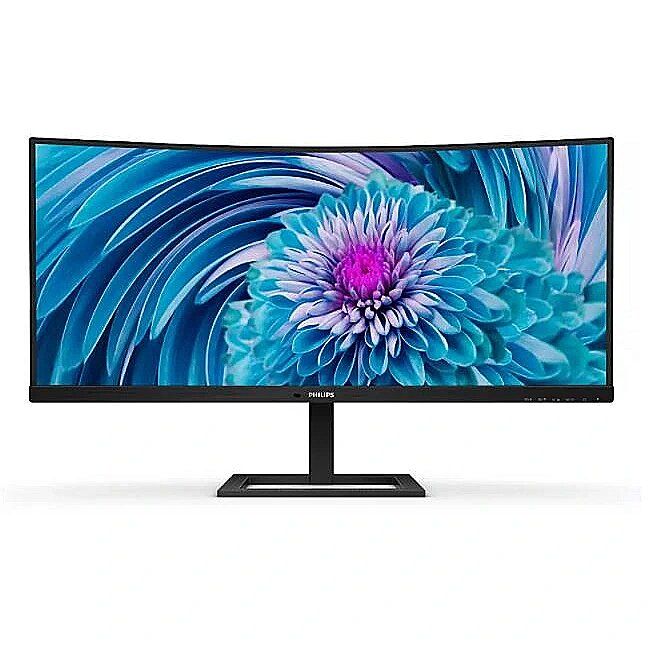
Zakrzywiony wyświetlacz Philips UltraWide E line zapewnia panoramiczny obraz. Ekran WQHD i ergonomiczna podstawa zapewniają idealne warunki oglądania. Wszechstronne złącze USB-C, wbudowany koncentrator USB i funkcja MultiView spełniają wymagania w zakresie wydajności Podłączanie notebooka za pomocą jednego przewodu USB-C
Ten monitor Philips ma wbudowane złącze USB typu C z funkcją zasilania. Dzięki inteligentnemu i elastycznemu zarządzaniu zasilaniem możesz bezpośrednio ładować zgodne urządzenie. Smukłe, dwustronne złącze USB-C umożliwia łatwe podłączenie urządzeń z użyciem jednego przewodu. Możesz oglądać filmy wideo o wysokiej rozdzielczości i jednocześnie zasilać lub ładować zgodne urządzenie. Monitor z panelem VA pozwala cieszyć się wspaniałej jakości obrazem i szerokimi kątami widzenia
Monitor LED VA firmy Philips korzysta z zaawansowanej technologii wielofunkcyjnego dopasowania obrazu w pionie, która zapewnia niezwykle wysoki współczynnik kontrastu statycznego, a co za tym idzie bardzo żywy, jasny obraz. Jest idealnym rozwiązaniem zarówno w przypadku standardowych zastosowań biurowych, jak i w przypadku wyświetlania zdjęć, stron internetowych, filmów i gier oraz korzystania z wymagających aplikacji graficznych. Zoptymalizowana technologia zarządzania pikselami zapewnia dodatkowo niezwykle szerokie kąty widzenia 178/178 stopni co przekłada się na znakomitą wyrazistość obrazu. Krystalicznie czysty obraz na ekranie UltraWide QHD o rozdzielczości 3440 x 1440 pikseli
Monitory Philips wyświetlają krystalicznie czysty obraz UltraWide w rozdzielczości Quad HD 3440 x 1440 pikseli. Najwyższej jakości matryca o dużym zagęszczeniu pikseli i kącie widzenia 178/178 stopni pozwala tchnąć życie w każdy obraz i każdą grafikę. Format UltraWide 21:9 umożliwia osiągnięcie większej wydajności, ponieważ zapewnia więcej miejsca do porównywania elementów obok siebie i pozwala wyświetlać większą liczbę kolumn arkuszy kalkulacyjnych. Te wyświetlające krystalicznie czysty obraz monitory firmy Philips to idealny wybór dla wymagających projektantów pracujących z oprogramowaniem CAD/CAM lub finansistów używających na co dzień dużych arkuszy kalkulacyjnych. Szybki czas reakcji 1 ms MPRT zapewnia wyraźny obraz i płynną grę
Technologia MPRT (ang. Motion Picture Response Time, czas reakcji obrazu) to bardziej intuicyjny sposób bezpośredniego opisania czasu potrzebnego, aby rozmyty obraz stał się czysty i wyraźny. Przeznaczony do gier monitor firmy Philips z czasem reakcji MPRT na poziomie 1 ms skutecznie eliminuje rozmazywanie obrazu i niewyraźne sekwencje ruchu oraz zapewnia wyraźne i precyzyjne efekty wizualne, zwiększając przyjemność z rozgrywki. To najlepszy wybór do emocjonujących i wymagających płynności gier. Mniejsze zmęczenie wzroku dzięki technologii Flicker-free
Ze względu na sposób sterowania jasnością w ekranach z podświetleniem LED niektórzy użytkownicy zauważają migotanie na swoich ekranach, co powoduje zmęczenie wzroku. Technologia Flicker-free firmy Philips wykorzystuje nowe rozwiązanie, aby korygować jasność i ograniczać migotanie, dzięki czemu zapewnia większą wygodę podczas oglądania. Tryb LowBlue umożliwia pracę zdrowszą dla oczu
Badania wykazały, że podobnie jak promienie ultrafioletowe mogą uszkodzić wzrok, tak krótkie promienie niebieskie emitowane przez wyświetlacze LED również mogą mieć negatywny wpływ na oczy i z biegiem czasu przyczynić się do pogorszenia wzroku. Opracowany przez firmę Philips specjalnie z myślą o zdrowiu i dobrym samopoczuciu użytkownika tryb LowBlue zmniejsza emisję szkodliwego promieniowania niebieskiego dzięki wykorzystaniu inteligentnego oprogramowania. System prowadzenia przewodów ułatwia zachowanie porządku w miejscu pracy
Zarządzanie kablami to zmyślna konstrukcja, która pozwala utrzymać porządek w miejscu pracy dzięki odpowiedniemu ułożeniu kabli i przewodów niezbędnych do obsługi wyświetlacza. Zasilanie i ładowanie zgodnych notebooków z monitora
Monitor ma wbudowane złącze USB-C spełniające normy zasilania USB Power Delivery. Dzięki inteligentnemu i elastycznemu zarządzaniu zasilaniem możesz teraz zasilać i ładować zgodny model notebooka bezpośrednio z monitora za pomocą pojedynczego kabla USB-C. Technologia MultiView umożliwia jednoczesne podłączenie dwóch urządzeń i wyświetlanie dwóch obrazów
Monitor Philips z matrycą o ultrawysokiej rozdzielczości i z technologią MultiView obsługuje szeroką gamę źródeł sygnału. Technologia MultiView umożliwia aktywne podłączenie dwóch urządzeń i jednoczesne wyświetlanie obrazu z każdego z nich, dzięki czemu można na przykład sprawnie wykonywać w tym samym czasie wiele zadań na komputerze stacjonarnym i notebooku.
description_en - AMD FreeSync : No
Curved : Yes
NVIDIA G-SYNC : No
Panel type VA
Refresh rate : 100 Hz
Touch screen : No
VESA DisplayHDR : No
Response time 1ms
Contrast 3000:1
Brightness 300cd/m2
Basic information
Size 34"
Color : Black
Aspect ratio : 21:9
Application : Home & Office
Resolution UWWQHD 3440x1440
Functionality
Height adjustment : Yes
Flicker-free : Yes
Pivot : No
Swivel : No
Tilt : Yes
VESA wall mount : 100x100 mm
Ports and equipment
D-SUB port No
DisplayPort 1
DVI port No
HDMI port 1
Speakers Yes
USB Hub : Yes
USB-C Power Delivery : 65W
USB-C video input : 1
description_lv - AMD FreeSync : Nav
Curved : Ir
NVIDIA G-SYNC : Nav
Paneļa tips VA
Refresh rate : 100 Hz
Skārienjūtīgs ekrāns : Nav
VESA DisplayHDR : Nav
Reakcijas laiks 1ms
Kontrasts 3000:1
Gaišums 300cd/m2
Pamatinformācija
Izmērs 34"
Krāsa : Melna
Malu attiecība : 21:9
Pielietojums : Home & Office
Izšķirtspēja UWWQHD 3440x1440
Funkcionalitāte
Augstuma regulēšana : Ir
Flicker-free : Ir
Pivot : Nav
Swivel : Nav
Tilt : Ir
VESA sienas stiprinājums : 100x100 mm
Pieslēgvietas un aprīkojums
Pieslēgvieta D-SUB Nav
Pieslēgvieta DisplayPort 1
Pieslēgvieta DVI Nav
Pieslēgvieta HDMI 1
Skaļruņi Ir
USB Hub : Ir
USB-C Power Delivery : 65W
USB-C video ieeja : 1
description_ru - AMD FreeSync: нет
Изогнутый: Да
NVIDIA G-SYNC: Нет
Тип панели ВА
Частота обновления: 100 Гц
Сенсорный экран: Нет
VESA DisplayHDR: Нет
Время отклика 1мс
Контрастность 3000:1
Яркость 300кд/м2
Основная информация
Размер 34"
Цвет: Черный
Соотношение сторон: 21:9
Применение: Дом и офис
Разрешение UWWQHD 3440x1440
Функциональность
Регулировка высоты: Да
Без мерцания: Да
Поворот: нет
Поворотный: нет
Наклон: Да
Настенное крепление VESA: 100x100 мм
Порты и оборудование
Порт D-SUB Нет
Порт DisplayPort 1
Порт DVI Нет
HDMI 1 порт
Колонки Да
USB-концентратор: Да
Мощность питания USB-C: 65 Вт
Видеовход USB-C: 1
Design - Product colour - Black
Design > Colour of product - Black
Designation - CE+WEEE
dimensionalWeight - 22050
dimension depth - 224 mm
dimension height - 500 mm
dimension weight - 10000 g
dimension width - 980 mm
Display - Anti-glare screen - Yes
Display - Aspect ratio - 21:9
Display - Backlight type - W-LED
Display - Contrast ratio (typical) - 3000:1
Display - DDC/CI - Yes
Display - Digital horizontal frequency - 30 - 160 kHz
Display - Digital vertical frequency - 48 - 120 Hz
Display - Display brightness (peak) - 350 cd/m²
Display - Display brightness (typical) - 300 cd/m²
Display - Display diagonal - 86.4 cm (34")
Display - Display diagonal (metric) - 86.36 cm
Display - Display number of colours - 16.7 million colours
Display - Display resolution - 3440 x 1440 pixels
Display - Display sRGB - Yes
Display - Display surface - Matt
Display - Display technology - LCD
Display - Dynamic contrast ratio marketing name - Mega Infinity DCR
Display - Haze rate - 25%
Display - HD type - Wide Quad HD+
Display - Horizontal scan range - 30 - 160 kHz
Display - Maximum refresh rate - 100 Hz
Display - Native aspect ratio - 21:9
Display - NTSC coverage (typical) - 99.5%
Display - Panel type - VA
Display - Pixel density - 110 ppi
Display - Pixel pitch - 0.23175 x 0.23175 mm
Display - Response time - 4 ms
Display - Response time (fast) - 1 ms
Display - Screen curvature rating - 1500R
Display - Screen shape - Curved
Display - sRGB coverage (typical) - 121.3%
Display - Surface hardness - 3H
Display - Touchscreen - No
Display - Vertical scan range - 48 - 100 Hz
Display - Viewable size, horizontal - 79.7 cm
Display - Viewable size, vertical - 33.4 cm
Display - Viewing angle, horizontal - 178°
Display - Viewing angle, vertical - 178°
Display > Aspect ratio - 21:9
Display > Contrast ratio (typical) - 3000:1
Display > Display - 3440 x 1440
Display > Display brightness - 300 cd/m²
Display > Display diagonal - 34 "
Display > Display surface - Non-glossy, 3H, opacity 25%
Display > HD type - WQHD
Display > Maximum refresh rate - 100 Hz
Display > Panel type - VA
Display > Response time - 4 ms
Display > Viewing angle, horizontal - 178 °
Display > Viewing angle, vertical - 178 °
Display surface - Matt
Dodatkowe informacje o matrycy: Format obrazu - 21:9
Dodatkowe informacje o matrycy: Kontrast - 3000:1
Dodatkowe informacje o matrycy: Kąt widzenia w pionie - 178 °
Dodatkowe informacje o matrycy: Kąt widzenia w poziomie - 178 °
Dodatkowe informacje o matrycy: Liczba wyświetlanych kolorów - 16.7 mln
Dot pitch - 0.23175 mm
Dynamic contrast - Mega Contrast
EAN - 8712581770662
ean - 8712581770662
EANCode - 8712581770662
Eans - 8712581770662
EAN_code - 8712581770662
Efektywność energetyczna: Klasa energetyczna - G
Efektywność energetyczna: Zużycie energii w trybie czuwania - 0.5 W
Efektywność energetyczna: Zużycie energii w trybie pracy - 31.81 W
Energy class - G
Energy label - Pobierz
Ergonomics - Adjustable height (max) - 10 cm
Ergonomics - Cable lock slot - Yes
Ergonomics - Cable lock slot type - Kensington
Ergonomics - Height adjustment - Yes
Ergonomics - LED indicators - Operation
Ergonomics - LED indicators - Operation, Stand-by
Ergonomics - LED indicators - Stand-by
Ergonomics - Number of OSD languages - 21
Ergonomics - On Screen Display (OSD) - Yes
Ergonomics - On Screen Display (OSD) languages - Czech
Ergonomics - On Screen Display (OSD) languages - Dutch
Ergonomics - On Screen Display (OSD) languages - English
Ergonomics - On Screen Display (OSD) languages - Finnish
Ergonomics - On Screen Display (OSD) languages - French
Ergonomics - On Screen Display (OSD) languages - German
Ergonomics - On Screen Display (OSD) languages - Greek
Ergonomics - On Screen Display (OSD) languages - Hungarian
Ergonomics - On Screen Display (OSD) languages - Italian
Ergonomics - On Screen Display (OSD) languages - Japanese
Ergonomics - On Screen Display (OSD) languages - Korean
Ergonomics - On Screen Display (OSD) languages - Polish
Ergonomics - On Screen Display (OSD) languages - Portuguese
Ergonomics - On Screen Display (OSD) languages - Russian
Ergonomics - On Screen Display (OSD) languages - Simplified Chinese
Ergonomics - On Screen Display (OSD) languages - Simplified Chinese, Traditional Chinese, Czech, German, Dutch, English, Spanish, Finnish, French, Greek, Hungarian, Italian, Japanese, Korean, Polish, Portuguese, Russian, Swedish, Turkish, Ukrainian
Ergonomics - On Screen Display (OSD) languages - Spanish
Ergonomics - On Screen Display (OSD) languages - Swedish
Ergonomics - On Screen Display (OSD) languages - Traditional Chinese
Ergonomics - On Screen Display (OSD) languages - Turkish
Ergonomics - On Screen Display (OSD) languages - Ukrainian
Ergonomics - Panel mounting interface - 100 x 100 mm
Ergonomics - Picture-in-Picture - Yes
Ergonomics - Plug and Play - Yes
Ergonomics - Tilt adjustment - Yes
Ergonomics - Tilt angle range - -5 - 20°
Ergonomics - VESA mounting - Yes
Ergonomics > Height adjustment - 10 cm
Ergonomics > Height adjustment - Yes
Ergonomics > Pivot - No
Ergonomics > Swivelling - No
Ergonomics > Tilt adjustment - Yes
Ergonomics > Tilt angle - -5/20 °
Ergonomics > VESA mounting - Yes
Ergonomics > VESA mounting interfaces - 100 x 100 mm
Frequency, horizontal max. - 160 kHz
Frequency, horizontal min. - 30 kHz
Frequency, vertical max. - 120 Hz
Frequency, vertical min. - 48 Hz
Gewicht - 12.86
gross_weight - 11 kg
GRUPPE1 - Displays
GRUPPE2 - Lcd Monitor
GTIN - 8712581770662
guarantee - 36
guarantee_type - external
Height - 367 mm
Height adjustment - Yes
Height adjustment range - 100 mm
Height with stand - 495 mm
HERSTELLER - MMD - PHILIPS
Hoehe - 0.23
HSTNUMMER - 346E2CUAE/00
I/O connectors - 1 x Audio out
I/O connectors - 1 x DisplayPort
I/O connectors - 1 x HDMI
I/O connectors - 1 x USB (Type C)
I/O connectors - 1 x USB 3.2 Type-B Gen 1
I/O connectors - 4 x USB 3.2 Type-A Gen 1
Laenge - 0.98
Link - https://www.philips.lt/c-p/346E2CUAE_00/ultrawide-lcd-monitorius
Logistics data - Harmonized System (HS) code - 85285210
LongDesc - The Philips E line curved UltraWide display offers expansive panoramic visuals. A WQHD display with an ergonomic stand make for optimal viewing conditions. All-in-one USB-C and MultiView meet the need for productivity.
LongProductName - 346E2CUAE UltraWide LCD monitor
LongSummaryDescription - Philips E Line 346E2CUAE/00. Display diagonal: 86.4 cm (34"), Display resolution: 3440 x 1440 pixels, HD type: Wide Quad HD+, Display technology: LCD, Display surface: Matt, Response time: 4 ms, Native aspect ratio: 21:9, Viewing angle, horizontal: 178°, Viewing angle, vertical: 178°. Built-in speaker(s). Built-in USB hub, USB hub version: 3.2 Gen 1 (3.1 Gen 1). VESA mounting, Height adjustment. Product colour: Black
Manufacturer - Philips
Manufacturer_code - 346E2CUAE/00
Matrix type - VA
Model - 346E2CUAE
MPN - 346E2CUAE/00
Multimedia - Built-in camera - No
Multimedia - Built-in speaker(s) - Yes
Multimedia - Number of speakers - 2
Multimedia - RMS rated power - 5 W
Multimedia > Built-in speaker(s) - Yes
Multimedia > TV tuner integrated - No
Name - 86,36 cm/34" (3440x1440) Philips 346E2CUAE/00 21:9 WQHD VA 4ms 100Hz USB-C HDMI DisplayPort VESA Black
name - Monitor 346E2CUAE 34 inch VA Curved HDMI DP USB-C, height adjustment
Name - Philips 346E2CUAE - 100Hz | UWQHD | 34'' | VA | 4ms
Name - Philips 346E2CUAE/00, LED monitor (86 cm (34 inches), black, AMD Free-Sync, WQHD, 100Hz panel)
Name - Philips | UltraWide LCD Monitor | 346E2CUAE | 34 " | VA | WQHD | 21:9 | 100 Hz | 4 ms | 3440 x 1440 | 300 cd/m² | HDMI ports quantity 1 | Black | Warranty 36 month(s)
Networking > Ethernet LAN (RJ-45) ports - No
Number of colors - 16,7 mln
Ochrona oczu: Filtr światła niebieskiego - tak
Ochrona oczu: Redukcja migotania - tak
Operational conditions - Non-operating altitude - 0 - 12192 m
Operational conditions - Operating altitude - 0 - 3658 m
Operational conditions - Operating relative humidity (H-H) - 20 - 80%
Operational conditions - Operating temperature (T-T) - 0 - 40 °C
Operational conditions - Storage temperature (T-T) - -20 - 60 °C
Optional accessory -
Other features -
Other features - Certification - cETLus, CB, TUV/GS, TUV Ergo, CU-EAC, EAEU RoHS, CE Mark, FCC Class B, ICES-003, UKRAINIAN
Other features - Compliance certificates - RoHS
Other features - EasyRead mode - Yes
Other features - Exterior finish type - Textured
Other features - Heavy metals free - Hg (mercury)
Other features - Heavy metals free - Hg (mercury), Pb (lead)
Other features - Heavy metals free - Pb (lead)
Other features - LowBlue mode - Yes
Other features - Mean time between failures (MTBF) - 50000 h
Other features - MultiView - PIP/PBP mode, 2 x devices
Other features - Picture-by-Picture (PbP) - Yes
Other features - Picture enhancement - SmartImage game
Other features - Regulatory Approvals - cETLus; CB; TUV/GS; TUV Ergo; CU-EAC; EAEU RoHS; CE Mark; FCC Class B; ICES-003; UKRAINIAN
Other features - USB Power Delivery revision - 3.0
Package features > Embeeded battery - No
Package features > Gross depth (mm) - 975 mm
Package features > Gross height (mm) - 495 mm
Package features > Gross width (mm) - 224 mm
Package features > Packing quantity - 1.00 pc(s)
Package features > Palette Qty - 20 pc(s)
Package features > Paper/Pasteboard - 2500.00 g
Package features > Plastic (No PET) - 510.00 g
Package features > Tare weight (kg) - 3.01 kg
Package features > Volume (m3) - 0.108108 m³
Package features > WEE classification - CL109:2:2017-04-01
Package features > WEEE tax - Yes
Packaging content - Cables included - AC
Packaging content - Cables included - USB Type-C to USB Type-C
Packaging content - Cables included - USB Type-C to USB Type-C, AC
Packaging content - Manual - Yes
Packaging content - Stand included - Yes
Packaging content > Cables included - USB-C connection cable to USB-C, Power cord
Packaging data - Package depth - 224 mm
Packaging data - Package height - 500 mm
Packaging data - Package weight - 13.1 kg
Packaging data - Package width - 980 mm
PDF - http://www.blobs.lt/products/6/1/7/3/2/3/ec0fc629e058e7a9aa7d18486820c221/original.pdf
Performance - AMD FreeSync - Yes
Performance - AMD FreeSync type - FreeSync Premium
Performance - Component video sync - Separate sync
Performance - Flicker-free technology - Yes
Performance - Low Blue Light technology - Yes
Performance - NVIDIA G-SYNC - No
Ports & interfaces - Audio input - No
Ports & interfaces - Audio output - Yes
Ports & interfaces - Built-in USB hub - Yes
Ports & interfaces - DC-in jack - Yes
Ports & interfaces - DisplayPorts quantity - 1
Ports & interfaces - DisplayPort version - 1.2
Ports & interfaces - DVI port - No
Ports & interfaces - HDMI - Yes
Ports & interfaces - HDMI ports quantity - 1
Ports & interfaces - HDMI version - 2.0
Ports & interfaces - Headphone out - No
Ports & interfaces - Number of USB Type-B upstream ports quantity - 1
Ports & interfaces - USB hub version - 3.2 Gen 1 (3.1 Gen 1)
Ports & interfaces - USB Power Delivery (USB PD) - Yes
Ports & interfaces - USB Power Delivery up to - 65 W
Ports & interfaces - USB Type-A downstream ports quantity - 4
Ports & interfaces - USB Type-C DisplayPort Alternate Mode - Yes
Ports & interfaces - USB Type-C downstream ports quantity - 1
Ports & interfaces - USB upstream port type - USB Type-C
Ports & interfaces > DisplayPorts quantity - 1
Ports & interfaces > HDMI ports quantity - 1
Ports & interfaces > USB ports quantity - 1 x USB-C, 1 x USB-B, 4 x USB-A
Power - AC input frequency - 50 - 60 Hz
Power - AC input voltage - 100 - 240 V
Power - Energy consumption (SDR) per 1000 hours - 31 kWh
Power - Energy efficiency class (SDR) - F
Power - Energy efficiency scale - A to G
Power - Power consumption (off) - 0.3 W
Power - Power consumption (standby) - 0.5 W
Power - Power consumption (typical) - 41.6 W
Power - Power supply type - Internal
Power > Energy efficiency class - G
Power consumption - 31.81 W
Pozostałe cechy: Akcesoria - kabel USB-C
Pozostałe cechy: Akcesoria - kabel zasilający
Producent: Nazwa producenta / importera - Philips
MMD--Monitors & Displays Monitors & Displays Nederland B.V.
Prins Bernhardplein 200
1097 JBproducer - Philips
Producer - Philips
producerCode - 346E2CUAE/00
ProducerCode - 346E2CUAE/00
ProductName - 346E2CUAE/00
productName - Warranty month(s) | 346E2CUAE | 34 " | VA | WQHD | 21:9 | 4 ms | 300 cd/m2 | Black | HDMI ports quantity 1 | 100 Hz
productSize - Normal
Recycling data - Recyclable packaging material - 100%
Resolution - 3440 x 1440
Response time - 1 ms
Safety warning - Warnings - Do not disassemble the monitor casing to avoid risk of electric shock.
Safety warning - Warnings - Place the monitor on a flat and stable surface to avoid tipping and damage.
Safety warning - Warnings - Unplug the monitor from the power source before cleaning.
Screen size (diag.) - 34''
ShortDescription - 34'' | VA | UWQHD | 100Hz
ShortSummaryDescription - Philips E Line 346E2CUAE/00, 86.4 cm (34"), 3440 x 1440 pixels, Wide Quad HD+, LCD, 4 ms, Black
sizeX - 980
sizeY - 500
sizeZ - 225
Speakers built-in - Yes
Static contrast - 3 000:1
Stck_Kart - 1
Stck_Pal - 2
Storno - Y
Sustainability - Doesn't contain - Mercury
Sustainability - Doesn't contain - Mercury, PVC/BFR
Sustainability - Doesn't contain - PVC/BFR
TCO Certified - Yes
Technical details > Gross weight - 12.8 kg
Technical details > Net weight - 9.79 kg
Technical details > No flickering - Yes
Technical details > Producer - Philips
Technical details > Producer product family - UltraWide LCD Monitor
Technical details > Producer product name - 346E2CUAE
Technical details > USB-C - Yes
Technical details > USB-C power delivery - 65W
Title - Philips E Line 346E2CUAE/00 computer monitor 86.4 cm (34") 3440 x 1440 pixels Wide Quad HD+ LCD Black
title_en - Philips E Line 346E2CUAE Wide Quad HD+ LCD Monitor 34"
title_lv - Philips E Line 346E2CUAE Wide Quad HD+ LCD Monitors 34"
title_ru - Philips E Line 346E2CUAE Wide Quad HD+ LCD Монитор 34"
Touch screen - No
Transreflective technology - LED
TV tuner built-in - No
URL - https://mmdmonitors.com/
vendpn - 346E2CUAE/00
VESA - 100 x 100
Viewing angle, horizontal - 178 °
Viewing angle, vertical - 178 °
Visible area, horizontal - 797.22 mm
Visible area, vertical - 333.72 mm
Warranty -
Warranty - 24
Warranty - 24 month(s)
WarrantyInfo -
warrantyLength - 36
warrantyType - F
Web camera - None
Weight - 7.83 kg
weight - 9.79 kg
Weight - 12,85
Weight - 12.6
weight - 13050
Weight & dimensions - Depth (without stand) - 110 mm
Weight & dimensions - Depth (with stand) - 257 mm
Weight & dimensions - Height (without stand) - 367 mm
Weight & dimensions - Height (with stand) - 495 mm
Weight & dimensions - Weight (without stand) - 7.83 kg
Weight & dimensions - Weight (with stand) - 10.1 kg
Weight & dimensions - Width (without stand) - 807 mm
Weight & dimensions - Width (with stand) - 807 mm
Weight with stand - 10.5 kg
Width - 807 mm
WiFi - No
Złącza: Złącza - 1 x DisplayPort
Złącza: Złącza - 1 x HDMI
Złącza: Złącza - 1 x USB Type-C
Złącza: Złącza - 1 x wyjście audio
Złącza: Złącza - 4 x USB 3.2
Złącza: Złącza - USB 3.0 upstream





 DVI is a digital standard and ensures high image quality, however, thanks to the big size of the plug and the inability of the standard to develop further due to a few technical restrictions this type of connection is gradually losing its popularity to modern HDMI and DisplayPort standards.